Profiles
A profile is one filtering policy with its own id, addresses, rules, settings and logs. An account can have several profiles. Each change that you make is saved as a new version of the profile. The new version gets to every PoP (server location) within seconds.
Switch and create
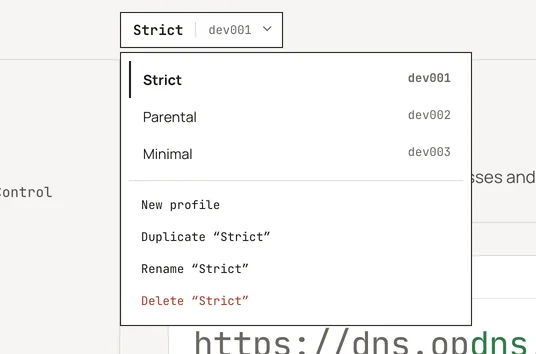
Section titled “Switch and create”The profile switcher at the top of the dashboard lists your profiles. To create a profile, choose New profile there. The dashboard assigns the id of the new profile.
The pages of each profile come in the same order:
| Page | What it holds |
|---|---|
| Setup | the addresses and linked IPs of the profile (Your endpoints), and if the device you are on uses them (Check it works) |
| Security | protections against malicious domains (Security) |
| Privacy | how much the profile blocks, on one five-step slider, and device telemetry per manufacturer (Privacy blocklists) |
| Parental Control | categories, services, SafeSearch (Parental control) |
| Denylist, Allowlist, Rewrites | your own rules (Rules) |
| Analytics | totals, timelines, top lists (Analytics) |
| Logs | live tail and search (Logs) |
| Settings | block answers, logging, resolution (Settings) |
| Nodes | self-hosted nodes (Nodes) |
| Devices | devices seen on the profile (Devices) |
Devices
Section titled “Devices”opdns knows a device by the name that the device puts in its encrypted DNS address (device names). You do not register devices. The first query with a new name creates the device, and logs and analytics group by it. To rename or forget a device, use the Devices page.
Concurrent edits
Section titled “Concurrent edits”Every profile resource carries its version as an ETag. If you edit the
same profile in two tabs, the dashboard refuses the second save and asks
you to reload. It does not silently overwrite the first save. The API works
the same way (If-Match, see Errors and limits).
Suspended profiles
Section titled “Suspended profiles”The opdns operators can suspend a profile, for example for a breach of the terms of service. Until the operators reinstate the profile, these rules apply:
- Queries are refused. Every query sent to the profile gets a
REFUSEDanswer. This includes its DoH, DoT and DoQ addresses, its linked IPs, its devices and its enrolled self-hosted nodes. The answer carries Extended DNS Error 15 (Blocked) with the textprofile suspended. When the operator gave an explanation, the text isprofile suspended: <reason>. Tools such asdigshow it asEDE: 15 (Blocked): (profile suspended: …). - Nothing is logged. opdns writes no query record and no hourly count for the profile, in the cloud or on an enrolled node. Logs that are already stored stay readable and expire with their retention as before.
- No changes are possible. Every page that sets filtering (Security,
Privacy, Parental Control, Denylist, Allowlist, Rewrites, Settings) is
read-only. The API answers changes to the profile, its devices and new
nodes with
409 profile_suspended. You cannot delete the profile while it is suspended. You can still read Setup, Analytics, Logs, Nodes and Devices. You can still revoke a node and send list reports.
Every page of the profile shows a banner: This profile is suspended by
the operator; its queries are refused until it is reinstated. The banner
also shows the explanation of the operator when there is one, and tells you
to contact support if you think that the suspension is a mistake. The API
returns the same explanation as the suspended_public_reason of the
profile. The suspension and the reinstatement each appear in
Activity (Profile suspended
by the operator, Profile reinstated by the operator). The operator also
records an internal note. opdns never shows this note in the dashboard, the
API, DNS answers or your data export.
An enrolled self-hosted node receives the suspension like any profile change. It refuses the queries of the profile in the same way. A node release older than v0.1.19 resolves a suspended profile without filtering instead. To get the behavior above, upgrade the node.
To see how a suspension gets to the PoPs and nodes, read Architecture.